The Raritan Blog
Home » Raritan Blog
3-phase, 50a to 60a 208V Power Strips (Rack PDUs) Demystified, Part II : Understanding Capacity
Henry Hsu
April 9, 2013
Despite the growing ubiquity of 3-phase power distribution (at 208V) in North American data centers, data center operators are still not sufficiently fluent with the real-world capacity implications of 3-phase power in their cabinets.

The principal reason is because—at 208V—the math required to understand 3-phase power distribution at the cabinet is completely counter-intuitive.
THE TWO MOST COMMON QUESTIONS I GET are some form of the following:
- On a single-phase power strip, I was able to power 10 servers. So how many will I be able to plug into this three-phase power strip? 30?
- I have a three-phase, 30A power strip. Does that mean I can have up to 30amps on each of the three phases of the power strip? That is, 90A total?
Whatever you think is reasonable in your head is, in fact, not actually the way it works. So the answer to both of the above questions is, “no”.
In a previous post, I attempted to explain at a lower-level the reasons why this is true—including a link to a very useful Excel spreadsheet to help you calculate 3-phase rack PDU loading and capacity planning.
But I realize that most people are like me (lazy). You don’t need to know the electrical rationale for the counter-intuitive math, you just need to know the answers! So in this post you will find just the main information you need to do simple capacity planning (without explaining the reasons why). I guess I really should have posted this first. Whoops!
THE SHORT VERSION: 2 Primary Tips
1. If you don’t totally, 100% understand 3-phase power distribution, it is best if you do NOT think or speak in terms of amps. In all likelihood, you will say something incorrect that confuses your electrician.
Instead, think about how many watts your equipment consumes, and how many watts your 3-phase power strip can provide. Watts are universally comparable, regardless of the supplied electrical configuration available at your rack: both your power strip manufacturer and your IT equipment vendor will tell you how many watts can be supplied. No matter what voltage you use; the rated current (amps); or whether you have 1-phase power or 3-phase power; etc… you can always compare watts.
If you absolutely must think using amps (i.e., “My Dell salesperson says this server will draw a maximum of 1.4A; and that’s all he will tell me.”), then I strongly suggest you: (a) download and use our 3-phase calculator here; and (b) consult the right-most column of the following cheat-sheet.
2. Print out this chart, pin it on your bulletin board ... and trust no other document on earth. (Click to view as high-resolution PDF).
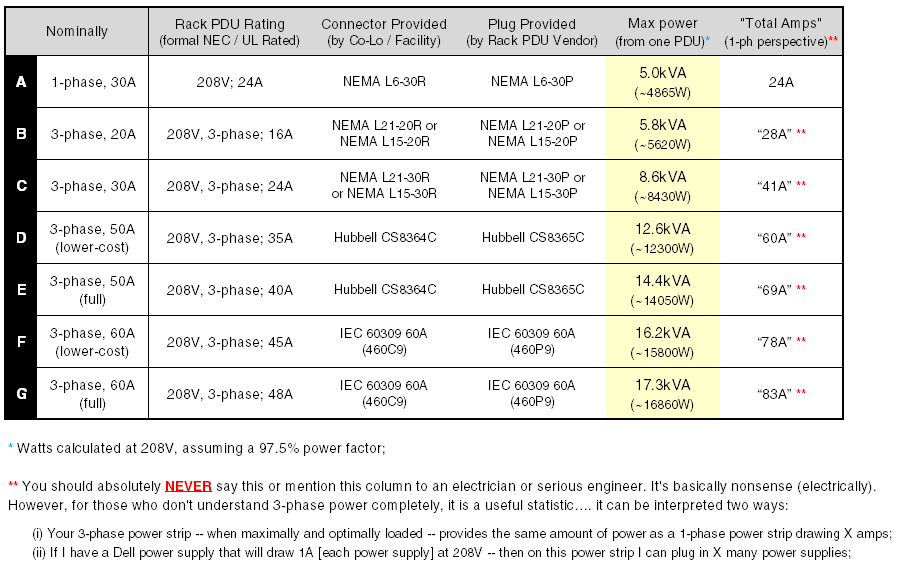
SOME OBSERVATIONS
- This chart (and this blog post) applies ONLY to 208V, 3-phase power. If your facility utilizes 400V, 3-phase; or 415V, 3-phase power [i.e. most of EU, many other countries, and many of Raritan’s largest customers in North America]—then this information does not apply to you!!!
- Compare A and C in the chart above. Note that going from a single-phase (30A) power strip to a three-phase (30a) power strip does NOT get you 3x more power. That is a common misconception. Instead, you get 1.732x more power [the square root of 3]. Again, you will have to consult my previous post for an explanation why.
- Most rack PDU Manufacturers offer two versions of “50A, 3-phase” power strips—Options D and E in the chart above. In both cases, your co-location facility (or data center facility) provides a 50A, 3-phase input. But one power strip costs much less than the other. That is to say, moving from D to E increases the power strip’s costs materially, while offering only ~14% more power. That is why Rack PDU vendors often recommend Option D. EXCEPTION TO THE RULE: Most co-location customers [i.e., not owner/operator].
- Similarly, many rack PDU Manufacturers offer two versions of “60A, 3-phase” power strips—Options F and G in the chart above. This is less common but does occur on occasion.
THIS INFORMATION IS VENDOR NON-SPECIFIC
Please note that all the information in this post is not specific to Raritan power strips—but is vendor-agnostic… it’s just math. (Of course, if you do find this information beneficial, I sure would appreciate your considering Raritan as a potential provider for critical power distribution in your next build.)
Learn the most innovative features of rack power distribution units.
Gathering Intel on Data Center Power Consumption
Richard Brooke
April 3, 2013
Raritan’s iPDUs plus Power IQ® Software lead to lower Data Center Opex

What if, the next time you opened your home electric bill, instead of a lump sum of kilowatt-hours, you found an itemized list of every electrical appliance — down to each and every light bulb—that drew power that month, and how much you’re spending to run it? Instead of shrugging and hunting down your checkbook, you would have useful information you could use to drive that bill down.
You would know what it’s costing to keep that spare freezer in the basement. You’d know exactly who left the garage light on all night, or if your air conditioner was really living up to its energy star rating. You could take steps to avoid overpaying, enforce family policies, and make smarter purchases.
That’s just a glimpse of what can be done now for the data center, with the wealth of information pumped out by Raritan iPDUs. These units continually generate tons of real-time data down to the circuit-breaker or the outlet level, if you need it. In addition to your industry-standard amperage reading, these intelligent strips can push a tremendous amount of granular data through one IP drop. Connected to environmental sensors, they can continually report on temperature, humidity, open-closed contact status, airflow, and CO2 level as well. They can even stream a webcam feed.
Far from being TMI, this data is what empowers you to equip every rack with just the right amount of cooling, for example. And that’s not small potatoes: According to Gartner, data centers save four percent of their cooling budget for every degree they can raise the ambient temperature. A related example: that iPDU can also tell you —with 1% accuracy— how many kWh you’re consuming every month to power any particular blade server. And since you’re billed in kWh, you’ve now got an apples-to-apples comparison between consumption and cost, or between different hardware models and configurations.
Knowing which aisles are hot, and which are not
With a clickable, real-time display on the PDU and the capacity for up to eight temperature and eight humidity sensors, you can discover aisle-specific hot spots to more accurately concentrate your cooling. You can determine if there’s a systemic problem, or just a vent, for example, that’s been blocked by a carelessly placed briefcase. You can keep humidity levels high enough to prevent electrostatic discharge, and low enough to discourage hardware corrosion and with that, early system and component failure.
Raritan’s Power IQ software is what takes in all this data from Raritan’s, as well as competitors’, intelligent PDUs, analyzes it, and makes it actionable. It can aggregate and analyze data across multiple centers in multiple sites, and even generate ODBC-exportable reports.
In my next blog, we’ll talk a bit more about Power IQ and Raritan’s EMX controller, which allow you to set thresholds, alerts, and generally inject invaluable smarts into one of the dumbest things in your data center—the rack.
Click here to learn more about Raritan’s data center power management solutions
Click here to follow our group on Linkedin
Join Raritan & 400+ Executives on April 11th at the Data Center Summit in Santa Clara
Dorothy Ochs
April 1, 2013
Hear 40+ Speakers, Including New Industry Voices & Active Data Center Real Estate & Technology Firms
With the combined economic recovery and rapid rise in interest in the data center real estate and technology infrastructure sectors, there could not be a more important forum to separate fact from fiction.
Date: Thursday, April 11, 2013
Location: Santa Clara Convention Center, 5001 Great America Parkway, Santa Clara, CA 95054
Stop by the Raritan table to see the latest power management solutions. You’ll be entered into a drawing for a Blu-ray player. For more details and to register, please visit http://cre-events.com/dcnorcal2013/.
Gamer Heads, Power Down.
Joel Bryan
March 27, 2013

In a recent study by Carnegie Mellon University, it is believed that video game consoles cost U.S. homeowners more than $1.24 billion per year. A significant portion of that cost is due to 10.8 terawatt-hours of power consumption (is that right?), according to their study.
We can all agree wasted energy adds up quickly when you have gamers starting at a very young age and continuing into adulthood. No worries, just like anything else there is a solution, and believe it or not, it is SIMPLE. All your games really need to do is fully turn off the console when you are done. And don’t worry, your game will save. It’s no longer the days of the Atari 2600 when all your settings and achievements get lost when you power down.
Sony and Microsoft have worked to make their products more energy efficient; however, both the Xbox 360 and PS3 still draw significant power. If gamers choose to let their consoles go into standby mode and not completely power them down as they often do, the game console can continue to consume about 75 watts of power..
To provide the consumer with a better understanding of this high cost and wasted power issue, game console manufactures can create efficiency charts that show the power wasted over a certain period of time if the console does not get completely powered off.
Manufacturers can utilize Raritan iPDUs to implement power efficiency testing methods that can build a framework for game console power utilization efficiency standards.
LED-backlight Console Drawer for At-the-Rack Server Access - Now Available
Paula Alves
March 21, 2013
Looking for fast and dependable at-the-rack access to your servers for deployment, administration and maintenance activities? Now with Raritan’s T1700-LED Console Drawer, with a LED-backlight LCD display, you can get consolidated access to multiple servers from a single location and get energy savings.
Connecting to your existing analog or digital KVM switches, Raritan’s T1700-LED combines video, keyboard and touchpad functionality to enable the use of a single workstation to manage a rack, or multiple racks of servers.
Raritan’s T1700-LED is designed with an Energy Efficient LED-backlight LCD display which reduces energy consumption up to 20-50%, over current LCD cold cathode fluorescent (CCFL) back-lit technology. The LED-backlight technology provides for better contrast and brightness, greater color range, and more rapid response to changes in scene and more accurate image rendering for a clean, crisp display.
Download our spec sheet or visit https://www.raritan.com/products/console-drawers/T1700-LED-Console-Drawer to learn more.
Subscribe
Upcoming Events
Latest Raritan News
- Legrand Introduces Next-Generation KVM Platform Built to Bring Critical Systems Back Online in Minutes
- Posted on July 20, 2026
- Greater Choice, Scalability, Speed: Why Legrand is Doubling Down on Open Compute Project Innovations
- Posted on October 3, 2025
- Legrand Brings Greater Flexibility to Data Center Operators with New Intelligent Rack PDU Universal Input Option
- Posted on February 26, 2025
- Legrand Expands Full Suite of DX2 SmartSensors, Keeping Data Centers Ahead of Rack Power and Environmental Monitoring Challenges
- Posted on December 18, 2024
- Legrand Wins Back-to-Back Awards for Intelligent Rack Power Distribution Innovation
- Posted on May 24, 2024