| United States |
Home > Products > KVM-over-IP > KX II-101
Email
E-MAIL

PRINT

Dominion® KX II-101 V2

Dominion KX II-101

The Dominion KX II-101 V2 provides the secure access and control of a full-featured KVM-over-IP switch in an inexpensive, portable, nonblocking, palm-size package.

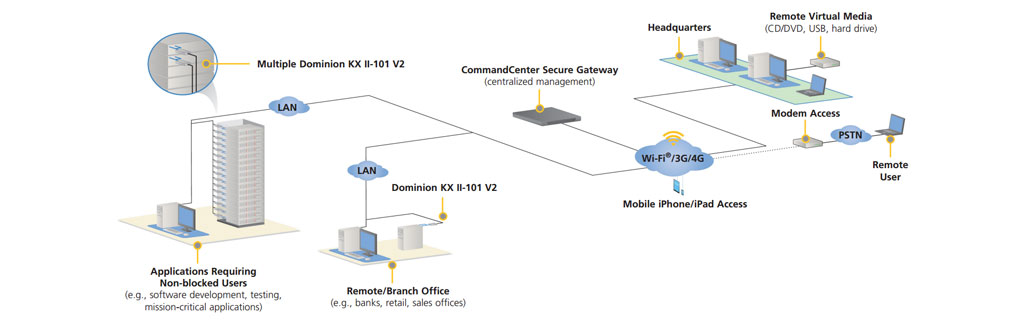
The Raritan Dominion KX II-101 V2 is a single port, KVM-over-IP switch that gives you secure remote access and control – especially for servers outside the data center.  Designed as a zero-U, one port, multiuser device, it provides anytime, anywhere un-blocked BIOS level, IP access and control.

View the technical specifications for the Dominion KX II-101 V2

OVERVIEW

A series of enhanced productivity, efficiency and security features come standard in the
KX II-101 V2:

  • Virtual media to mount drives/media on remote servers to support installation, remote booting and diagnostics
  • Absolute Mouse Synchronization™, which reduces installation time and sets a new standard for mouse synchronization
  • Secure, 256-bit AES encryption, FIPS 140-2 encryption and strong password settings
  • At-the-rack access via a local port and up to 8 remote IP users
  • Mobile access via iPhone or iPad (CC-SG is required)
  • Chinese and Japanese language support
  • Multifunction serial port for local administration, remote power control or optional modem access
  • Integrated remote power control with Raritan’s PX rack PDU
  • Centralized access and management through CommandCenter® Secure Gateway
  • IPv6 support
  • 1920x1080 video resolution 

Innovative Customer Applications

Of course the Dominion KX II-101 V2 enables remote access and control in data centers.  In addition, it provides KVM-over-IP access for many innovative applications:

  • Small Business and Branch Offices
    • Banks, retail stores, medical, legal and branch offices of all types
    • State, county and municipal governments
  • Development and Test Labs
    • Unblocked server access for mission critical servers
    • Portability for dynamic environments
  • IP Enabling of Analog KVM Switches
    • KVM over IP without the rip-and-replace
  • Hosted Environments and Cloud Computing
    • Customer access to hosted and off-premise servers
    • Remote troubleshooting
  • Closets, Cubes, Desktops and Home Offices
    • Remotely access servers and PCs outside the data center
  • Nontraditional Environments
    • Inexpensive, portable with zero-U mounting
    • Energy, utilities, and government
    • Mobile, temporary, military and tech support use cases

 View the technical specifications for the previous generation Dominion KX II-101

BENEFITS

Features

Benefits

Flexibility

Non-blocked KVM-over-IP Access

The KX II-10-V2 is a single port, single user KVM-over-IP device, so it is ideal for environments where unblocked access to servers or PC's is required, such as data centers, computer rooms and labs.

“Zero-U” Form Factor

The KX II-101-V2 is a palm-sized device, suitable for applications where space is limited such as remote/branch locations, closets, desktops and other non-data center applications. 

Virtual Media

Mount remote drives/media on the target server or PC to support software installation, remote booting, file transfer and diagnostics. The Dominion KX II-101-V2 supports a wide variety of media options, including CD/DVD drives, local hard-drives, USB drives, and ISO image files.

Power Options

The KX II-101 V2 is powered by an external adapter and does not support PoE like the previous generation.

Availability

Apple® iPhone® and iPad® Mobile Access

Users can remotely access and control servers through Apple iPhone and iPad devices with the same level of security that they now enjoy via their laptops. CC-SG is required.

Local Access to Connected Server

The KX II-101-V2 provides local access to its connected server, but no local port cable is required.

Dual Stack IPv4 and IPv6 Networking

The Dominion KX II-101-V2 provides dual stack IP networking with simultaneous support of IPv4 and IPv6.

Optional Modem Access

The Dominion KX II-101-V2 has a multi-function serial port, which can be used to connect to an external modem for out-of-band, emergency access.

Security

256-bit AES Encryption

The Dominion KX II-101-V2 uses the Advanced Encryption Standard (AES) encryption for added security. AES is a U.S. government approved cryptographic algorithm that is recommended by the National Institute of Standards and Technology (NIST) in the FIPS Standard 197. 256 bit AES encryption is available

Validated FIPS 140-2 Cryptographic Module

For government, military and other high security applications, the Dominion KX II-101-V2 is the first device in its class to use a validated FIPS 140-2 Cryptographic Module for enhanced encryption. Modules tested and validated as conforming to FIPS 140-2 are accepted by federal agencies of the U.S. and Canada for the protection of sensitive information.

Configurable Strong Password Checking

The Dominion KX II-101-V2 has administrator-configurable, strong password checking to ensure that user-created passwords meet corporate standards and are resistant to brute force hacking.  The administrator can also enforce password aging and lockout after failed attempts.

User Group and Port-level Permissions

Administrators can ensure that only the right people access remote IT equipment by setting permissions down to the port level.  Administrators can also grant or deny virtual media and power cycling privileges.

RADIUS, LDAP and Active Directory® Authentication

The Dominion KX II-101-V2 integrates with industry-standard directory servers, such as Microsoft®'s Active Directory, using either the LDAP or RADIUS protocols. This allows the Dominion KX II-101-V2 to use pre-existing username/password databases for security.

Configurable Security Banner

For government, military and other security conscious customers requiring a security message before user login, the KX II-101-V2 can display a user-configurable banner message and require acceptance before user login.

“Stealth Mode” with Configurable Port Numbers

For customers wishing to increase security by avoiding the standard TCP/IP port numbers, the Dominion KX II-101-V2 allows the administrator to configure alternate port numbers.

Upload Customer-Provided SSL Certificates

Customers can upload to the Dominion KX II-101-V2 digital certificates (self-signed or certificate authority provided) for enhanced authentication and secure communication.

Ease of Use

Absolute Mouse Synchronization™

The Absolute Mouse Synchronization feature is the ultimate mouse synchronization solution. For servers with a compatible USB mouse port, there is no need to adjust the mouse settings on the target server. This reduces installation time and enhances the Dominion KX II-101-V2's plug-and-play nature. In addition, the remote and target server mouse pointers never go out of synchronization.

Next Generation Common User Interface

The Dominion KX II-101-V2 has a next-generation, browser-based user interface for enhanced usability and productivity. This interface is common across the local port, remote access, management software as well as other Raritan products. This reduces training time and increases productivity. 

High Definition (HD) Remote Video Resolution - 1920x1080

The Dominion KX II-101-V2 supports High Definition (HD), 1080p remote video resolution. In addition, popular widescreen formats are supported including 1600x1200, 1680x1050 and 1440x900, so remote users can work with today’s higher resolution monitors.

PC Share Mode

Up to eight users can connect and remotely access each connected server. This feature is very useful for administrator collaboration for teamed troubleshooting of servers.

Plug-and-Play Appliance Offers Quick and Easy Setup

The Dominion KX II-101-V2 is a completely self-contained units All KX II-101-V2 features, including authentication and Web access, are built into the unit and do not require the use of an additional server.

Asian Languages – Japanese and Simplified/Traditional Chinese

The Dominion KX II-101-V2’s remote HTML User Interface and the KVM Clients now support the Japanese, Simplified Chinese and Traditional Chinese languages. This is available over IP as well as through CC-SG.

Manageability

Remote Management and Administration

Administrators can perform all management, administration and configuration operations, using a simple graphical user interface, remotely from the convenience of their desktops, or while in the data center or lab via CLI.

Remote Power Control

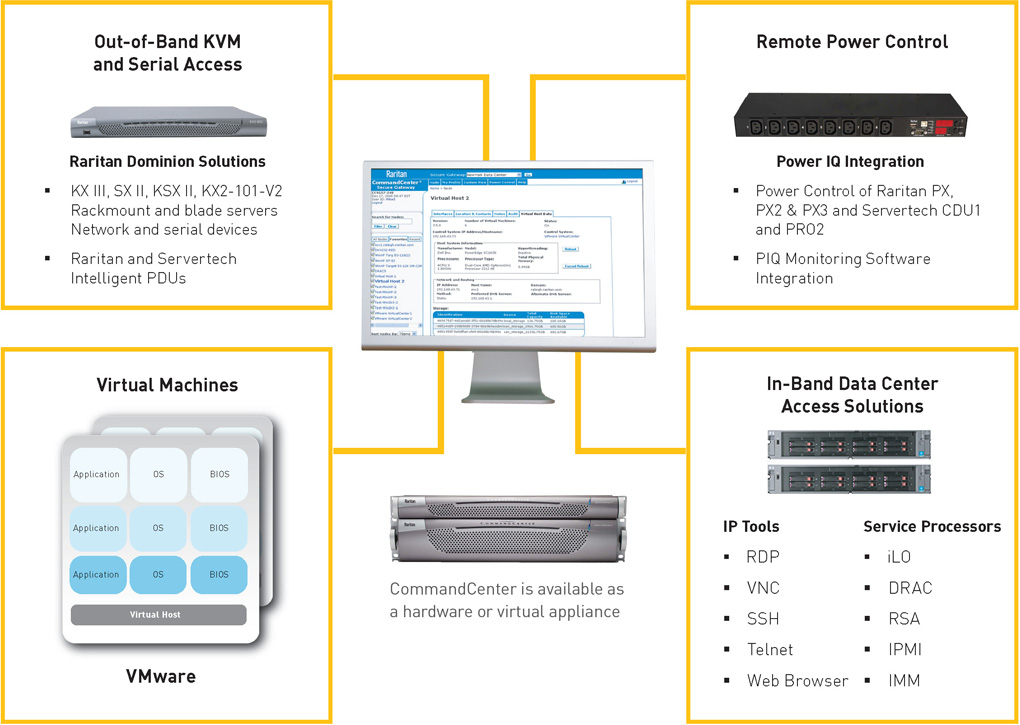
The Dominion KX II-101-V2 has a multi-function serial port that can be used to connect Raritan’s intelligent PDU, the PX™, to the KX II-101-V2.  This enables users to remotely power cycle servers from the KX II-101-V2 management interface.

SNMP Management and Syslog

The Dominion KX II-101-V2 distributes SNMP traps for important user and system events to SNMP management systems. SNMP traps are fully configurable by the administrator. SNMP v2 and V3 are supported. Syslog logging is also supported.

Firmware Upgrade over Ethernet

Dominion KX II-101-V2 firmware upgrades can be downloaded directly from the Raritan web site and upgrades can be performed via the network. With CC-SG, administrators can update multiple KX II 101-V2’s simultaneously.

Centralized Management with Raritan's CommandCenter® Secure Gateway

Like the rest of the Dominion series, the Dominion KX II-101-V2 features CommandCenter® Secure Gateway integration, allowing enterprise users to consolidate all Dominion devices into a single logical system, accessible from a single IP address, and under a single management interface.

FAQ

Questions 

Answers 

What is the difference between the Dominion KX II-101-V2 and the previous generation Dominion KX II-101?

The Dominion KX II-101-V2 is the latest generation, economically priced model. The V2 supports virtually all the features of the previous generation KX II-101, plus many exciting additional features. The V2 version does not have support for Power-over-Ethernet (PoE) or a PS2 local port.

How does the Dominion KX II-101-V2 work?

Dominion KX II-101-V2 connects to the keyboard, video, and mouse ports of a server. It captures, digitizes, and compresses the video signal before transmitting to a remote client PC using Raritan's powerful frame-grabber and compression technology. Dominion KX II-101-V2 provides a rich set of features through an intuitive user interface. It can also be centrally managed with other management devices via CommandCenter® Secure Gateway.

What types of computers can be controlled remotely by Dominion KX II-101-V2?

Dominion KX II-101-V2 works independently of a target server's hardware, operating system, or application software, accessing a target server's main input/output devices - keyboard, video, and mouse. Consequently, any hardware that supports standard PC keyboard and mouse interfaces, and standard PC video (VGA) can be used with Dominion KX II-101-V2.

Are there security features to protect my target servers from an unauthorized remote connection?

Yes. The KX II-101-V2 provides many layers of security – - connection authentication and data transfer security during a remote session. User names, passwords,and private -keys are used to authenticate users. Dominion KX II-101-V2 can authenticate users against the database locally resided on Dominion KX II-101-V2, or against external AAA servers (LDAP, Active Directory®, or RADIUS). All keyboard, video and mouse data are encrypted with up to 256-bit AES.

What types of Virtual Media does the Dominion KX II-101-V2 support?

The KX II-101-V2 supports the following types of media: internal and USB-connected CD/DVD drives, USB mass storage devices, PC hard drives and remote drive images.MasterConsole CAT supports USB and PS/2 keyboards and mice interfaces. It does not support Sun.

Is Virtual Media media secure?

Yes. Virtual Media sessions are secured using 256 bit AES encryption.

Does the KX2-101-V2 have a local port?

Yes, it has a VGA/USB local port, but no local port cable is required. To get local access to the connected server, connect your LCD monitor to the “Local VGA” port on the KX2-101-V2. Connect your USB keyboard and mouse directly to the target server.

What new features are available in the latest release?

With Release 3.5 (and above), the following features are now available:

  • 1920x1080 Video Resolution
  • iPad/iPhone Access (requires CC-SG)
  • Dual Stack IPv6
  • FIPS 140-2 Encryption Module
  • Logoff User
  • SNMPv3
  • Chinese and Japanese User Interfaces
  • Help Menu
  • Login Banner
  • Customer SSL Certificate Upload
  • Configurable Port Numbers

SCREENSHOTS

Port Access Page

Port Access Page

This is the main administrative screen for connecting to the KVM-over-IP target or performing admin functions.

Connect and Power Cycling Options

Connect and Power Cycling Options

From the Port Access Page, the user can click on the KVM port to connect to the target device. If the device is also connected to a Raritan PDU, like the Dominion™ PX, the user can also power on/off/cycle the target.

Security Settings Page

Security Settings Page

From the Security Settings page, users can specify login limitations, user blocking, password rules, encryption settings and PC share mode.

Group-Level Permissions

Group-Level Permissions

For each user group and server port, the admin can specify the type of access, the level of virtual media control , and the power control permissions.

KVM Port Configuration

KVM Port Configuration

This page allows users to name the KVM port, establish power control (if connected to a Raritan PDU) and choose mouse synch and virtual media preferences.

Remote Power Control

Remote Power Control

This page shows the ability to power on/off specific outlets if the KX II-101 is connected to a Raritan intelligent PDU like the Dominion PX. Administrators are able to specify who has power control rights via the Group-Level Permissions screen.

Event Management - Settings

Event Management - Settings

The KX II-101 Event Management feature provides a set of screens for enabling and disabling the distribution of system events to SNMP Managers, Syslog, and the audit log.

Event Management - Destinations

Event Management - Destinations

The Event Management - Destinations page is used to select which system events to track and where to send this information.

ORDERING INFO

Skip Navigation Links.
Expand <div runat='server' id ='divSectionNode' class ='SectionNode' visible ='true'>Switches</div>
Switches
Expand <div runat='server' id ='divSectionNode' class ='SectionNode' visible ='true'>Accessories</div>
Accessories
Expand <div runat='server' id ='divSectionNode' class ='SectionNode' visible ='true'>Warranties</div>
Warranties

TAKE THE NEXT STEP

What's New?

Dominion KX II - The world's Best KVM-over-IP switch now supports IBM, HP and Dell blade servers!

Special offer for Avocent Customers. Learn more.

Download Data Sheet
Take a Test Drive
How to Buy