| United States |
Home > Products > Centralized Server Management > CommandCenter Secure Gateway
Email
E-MAIL

PRINT

CommandCenter Secure Gateway

CommandCenter Secure Gateway

Remotely manage your virtual machines, blade systems, rack servers, networking devices, and power distribution units – your entire heterogeneous IT infrastructure located anywhere in the world – from a single Web browser-based interface.

OVERVIEW

Raritan’s CommandCenter® Secure Gateway (CC-SG) is an easy to deploy, plug-and-play appliance, that provides IT administrators and lab managers with a secure, single point of remote access and control.    

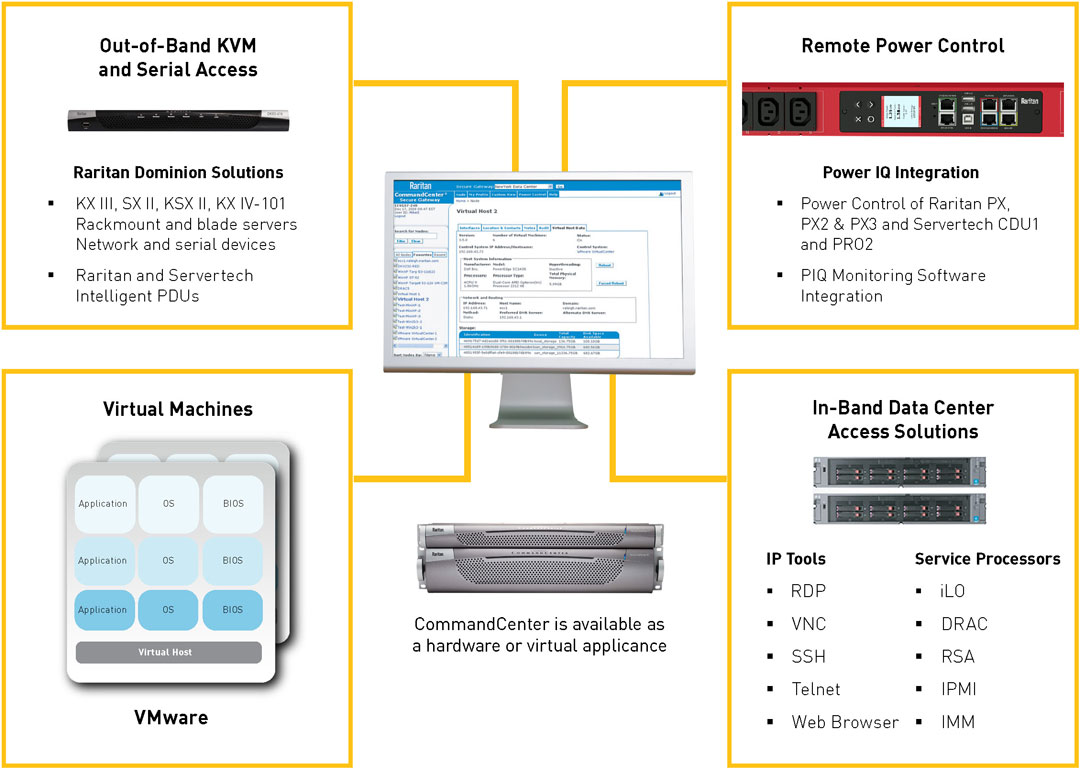
Raritan’s CC-SG consolidates multiple access technologies, including KVM-over-IP, service processors, and in-band methods such as RDP and VNC.  By simplifying remote management, expediting troubleshooting, and providing remote power control, CC-SG maximizes uptime and productivity of your physical and virtual servers, intelligent PDUs, and serial switches. 

CC-SG is a perfect compliment to our Power IQ power management solution and enables power control of devices connected to any PDU managed by Power IQ – without leaving the CC-SG GUI. Plus, data can be synchronized automatically between the two products. 

View the technical specifications for CC-SG E1 and CC-SG V1

Download a free virtualized evaluation copy of CC-SG for up to 16 nodes and interfaces
(runs on VMware, including ESX/ESXi and VMware Player). Includes a built-in license.

Download Now


CommandCenter Secure Gateway provides:

Unified Access
By entering a single IP address into a standard web browser running on either a PC (Windows, Linux, Mac), smartphone or tablet PC, an IT or lab administrator can have:

  • Out-of-band BIOS-level access to blade and rack-mounted servers via Dominion KX II KVM-over-IP switch, serial devices, or service processors (ie. iLO, DRAC, RSA)
  • BIOS-level access to virtual servers via VMWare Viewer
  • In-band access to servers via RDP, VNC, SSH, Telnet and VMWare’s VI Client

Consolidated Security
Remote server access is more secure with centralized authentication, authorization and logging.   

  • Users are authenticated against LDAP, Active Directory®, RADIUS and TACACS+
  • Sophisticated role-based authorization determines users’ access and power control privileges.
  • Consolidated audit logs and reporting helps meet compliance requirements.
  • All data traffic, including that of video, virtual media, keyboard and mouse, is encrypted with selectable encryption mode – 128- or 256-bit AES and 128-bit SSL.

Management of Heterogeneous IT infrastructure located anywhere in the world


BENEFITS

Raritan’s CommandCenter Secure Gateway (CC-SG) provides IT administrators and lab managers with consolidated, secure and simplified remote access and control of all technology platforms at the application, operating system and BIOS level.

Feature Summary
  • Secure, single sign-on to a single IP address for managing all of Raritan’s Dominion® KVM-over-IP switches, console servers, Paragon® II analog KVM switches and PX™ intelligent PDUs
  • Single point of access to physical servers (including blade systems, PCs and servers), virtual machines and VMware® infrastructure such as the ESX/ESXi server and VirtualCenter environments
  • Remote access and power control using HP® integrated Lights-Out (iLO), Dell® Remote Access Controller (DRAC), IBM® Remote Supervisor Adaptor (RSA) and IPMI service processors, plus RDP, VNC, SSH and Telnet in-band applications
  • Available as a rack-mountable hardware solution or a virtual appliance
  • HTML Access Client interface, which allows the user to easily locate managed equipment in customizable views, including favorites and recently accessed systems
  • Centralized, role-based policy management, including controlled access privileges
  • Wide, flexible array of client choices, including mobile client for access from smart phones and tablets
  • Universal Virtual Media™ support through Dominion KX II devices
  • Consolidated logging and audit trail, including detailed activity reports


Features

Functionality

Benefits

  • Support for
    Dominion KX II

CC-SG supports access to servers, PCs and other IT equipment connected to the Dominion KX II. KX II provides virtual media and Absolute Mouse Synchronization™ technology. CC-SG provides discovery, management, upgrades and many other management capabilities of KX II devices.

CC-SG provides seamless integration of access through different Dominion products such as environments with mixed Dominion KX and Dominion KX II devices.

Support for
Dominion SX

CC-SG supports access to serial devices connected to the Dominion SX.

You get centralized management of multiple SX units along with access to serial devices.

Virtualization: Integration of VMware

CC-SG provides streamlined, single sign-on access to your virtualized environment, the ability to issue virtual power commands to virtual machines and hosts, and a topology view with one-click connections. CC-SG integrates with VMware environments and supports connectivity to VirtualCenter software, ESX/ESXi servers and VMotion™ functionality.

You get consolidated access, power control and auditing of both physical and virtual servers.

Connectivity to virtual machines is always available even when these are moved from one virtual host to another.

Access to Blade Servers Connected to Dominion KX II Devices

CC-SG supports access of blade servers connected to Raritan Dominion KX II switches. Supported blade models include Cisco, Dell, HP and IBM blade servers.

You can access all connected nodes from a single client, including blade servers, rack servers, IP tools, service processors, PDUs, virtualized systems and devices connected to Raritan’s KVM solutions.

Support for Raritan’s
Dominion PX

CC-SG can discover and add Dominion PX “smart” power strips located on the IP network. Once added to the CC-SG as a network-managed device, the Dominion PX allows access to the administrative interface via a single sign-on. Additionally, Dominion PX outlets are available for configuration and association to existing CC-SG nodes (servers).

Note: The option of CC-SG integration to the PX through physical connectivity to Dominion devices via a power Computer Interface Module (CIM) or power cable is still available and supported.

For Raritan PX2-XXXX models, CC-SG connects to these rack PDUs via integration with Raritan’s Power IQ.

You enjoy comprehensive centralized access and management.

Your control of PX units can be independent of KVM or serial switches.

Access to In-Band Application and Embedded Service Processors

Telnet and SSH are supported as in-band serial console interfaces.

RDP, a common in-band console interface, can be used in either console or remote user modes. The RDP console allows the IT administrator to be the only RDP user on the server while the session lasts.

Service accounts can be created and stored on the CC-SG with an MD5 two-way encrypted password. Service accounts can be employed on all in-band interfaces to allow for use with remote or local authentication. Changing the service account password applies to all CC-SG interfaces using that service account.

You have the ability to connect to serial targets using Telnet protocol.

You’ll add flexibility by using RDP.

You’ll reduce the configuration time required to reflect password changes.

Robust Security

Low security profile, Linux®-based appliance architecture.

A powerful policy management tool allows access and control based on a broad range of user-customizable criteria, including time of day, physical location, application, operating system, department and function.

Available 128-bit and 256-bit AES encryption for end-to-end node access activity through AES-enabled Dominion devices.

Support for a broad range of authentication protocols, including LDAP, Active Directory®, RADIUS and TACACS+ in addition to local authentication and authorization capabilities.

Ability to import user groups from Active Directory.

Support for Second Factor Authentication with SecurID® on RADIUS servers.

IP-based access control lists (ACLs), which grant or restrict user access by IP address.

Proxy mode for secure access to devices through firewalls/VPNs.

Strong user password authentication, SAS 70 compliance for configurable amounts of failed log-in attempts and user ID lockout parameters.

CC-SG is a powerful, hardened, secure access platform that delivers peace of mind to IT managers who need to provide secure access to vital corporate resources.

Neighborhood Configuration

 A neighborhood of up to 10 CC-SG units can be deployed and work together to serve the IT infrastructure access and control needs of the enterprise. The units in a neighborhood may consist of hardware and/or virtual appliances. All units in a neighborhood must be running the same firmware version.

You can add more CC-SGs as your environment grows.

Performance is enhanced through the distribution of resources across CC-SGs.

Cluster  Configuration for Hardware Appliances

“Cluster” configuration provides appliance redundancy through primary and secondary CC-SG hardware appliances on different subnets and/or geographical locations.

CC-SG virtual appliances are not physically clustered. Raritan supports the VMware “High Availability” and “Fault Tolerance” features for easy-to-use, cost effective high availability.

You get instant, seamless failover if the primary unit fails.

Web Browser Access to Various Web Based Devices and Systems

CC-SG supports Web browser access to various devices and systems via IP address or host name. Single sign-on via the Web browser interface is available in some applications that can accept automatic username and password entries.
Access to the Dominion PX Web interface and Dell DRAC4 administrative UI are two examples of Web browser interfaces that support single sign-on.

CC-SG provides centralized and audited access to Web server-equipped devices such as KVM-over-IP switches, embedded service processors and many types of IP enabled devices.

Mobile access from Apple Smart Phones and Tablets

  • CC-SG’s Mobile KVM Client (MKC) enables out-of-band KVM access and power control from mobile devices. Apple iPad and iPhone® with IOS 4.0 or later are supported.
  • MKC supports out-of-band KVM access through Dominion KX II and power control through CC-SG power interfaces for DRAC, iLO, IPMI, RSA and VMware virtual machines. Also supported is power control of Power IQ®-managed PDUs, including Raritan’s PX platform.

CC-SG users enjoy the convenience of leveraging their smart phone or tablet for KVM and power control and management.

Provides the flexibility of accessing and managing IT resources from anywhere – at work, at home or while traveling.

Auditing and Audit Trail Reporting

The CC-SG administrator can sort the audit trail report based on categories. For example, the administrator can choose to view only authentication messages for remediation purposes, security messages for monitoring purposes or virtualization messages for virtual machine-related activity tracking.

CC-SG permits granular audit trail sorting for specific purposes like remediation, security and debugging.

Remote Monitoring and Capacity Planning Tools

CC-SG provides a variety of tools to monitor real-time and historical performance of CC-SG. Once activated, these tools can capture or display information such as CPU, memory, hard disk space, etc.

Using the real-time data capture tool, customers can view information in a graphic format and create email alerts based on thresholds they set. With the historical data trending reports, customers can see their CC-SG performance graphed over time.

CC-SG allows secure, remote monitoring tools that can be activated by customers to monitor their CC-SG hardware performance and alert them when action may be required on their part.

Streamlined Raritan Device Firmware Upgrade Process

The Task Manager device upgrade function can upgrade multiple devices concurrently. In addition, the user can determine a time window for the automated upgrade task.

An improved Restart Device automated task has been created. The CC-SG administrator can choose multiple devices and restart them at a selected time.
At the completion of the task, there is an Upgrade Status report generated in addition to an auto-generated email alert.

This feature is particularly valuable in environments where a large number of Dominion devices are managed by CC-SG, whether in a data center or distributed environment.

DRAC 6 Support

CC-SG provides access to Dell Remote Access Controller (DRAC) through the following interfaces:

  • Telnet
  • SSH
  • Web browser
  • IPMI power

Organizations with Dell servers who have migrated from DRAC 4 or 5 to DRAC 6 can conveniently access them through CC-SG.

Customers who need standard KVM access to some servers and access through DRAC to others can conveniently manage all resources through a single CC-SG client.

HP iLO, iLO2 and iLO3 Support

CC-SG supports single sign-on console access to HP servers equipped with iLO processors. In addition, CC-SG provides remote power on/off/cycle and graceful shutdown capabilities to these HP servers.

CC-SG increases productivity in environments where servers with iLO are deployed along with
CC-SG.

Personal View Customization Using Node Groups

In addition to creating customized views by predefined categories, customized views can be created using predefined node groups.
The CC-SG administrator can share custom views with all system users and, in addition, each user can create their own customized view using node groups and device groups.

Users can easily find the server or IT equipment they need to access.

By easily creating custom views and modifying them on the fly, CC-SG makes the IT staff’s work easier and more productive.

Virtual Media

CC-SG supports control of virtual media access policies. Three options of authorization are available for virtual media: deny, control and view only. Virtual media is available for systems connected through a virtual media CIM to Dominion KX II, KSX II and KX2-101-V2 devices managed by the CC-SG.

This feature makes it easy to
reimage (apply a new OS), boot or upgrade the device remotely.

WS-API Support

An optional Web Services API is available for customers to integrate their own systems with CC-SG.

This allows access of CC-SG, connected nodes and other CC-SG functions from customer applications.

Control Power for Servers Connected to any PDU Supported by Power IQ

Enables power control of CC-SG nodes (Power IQ IT devices) that are connected to multivendor PDUs being managed by Power IQ – without leaving their CC-SG client.

CC-SG users that have also implemented Power IQ enjoy the convenience of remote power control of their IT infrastructure without leaving CC-SG.

Devices can be connected to any PDU that is managed by Power IQ – including non-Raritan models.

Synchronize Data
with Power IQ

CC-SG pulls data from Power IQ for easy, convenient data synchronization.

Ensure that CC-SG and Power IQ have common infrastructure data.

Save time by not duplicating data entry tasks. Node, interface, device, port and other information is easily synchronized.

Data Import/Export

CC-SG includes a very comprehensive import/export capability. CSV files can be imported to help expedite the process of configuring devices, nodes, users, associations and PDUs. Import/export files include:

  • Import and export of categories and elements
  • Import and export of user groups and users
  • Import and export of nodes and interfaces
  • Import and export of devices and ports
  • Power IQ import and export file

By maintaining information in a spreadsheet, administrators can easily manipulate data and save it as a .csv file for importing into CC-SG, saving time.

Administrators can leverage the data already in CC-SG, easily export data from CC-SG, make any necessary changes, then return it to CC-SG or use it in other applications.

Can also share data between CC-SG and Power IQ.

Virtual CC-SG Evaluation Version

A software-only evaluation version of CC-SG is available, which can be installed on virtualized servers and PCs. The “Eval” is fully functional with a few exceptions:

  • Supports a maximum of 16 “interfaces”
  • Does not support the optional CC-SG WS-API

A DVD may be ordered (CCSG16-VA) or the evaluation may be downloaded from the Raritan website (www.raritan.com).

CC-SG can be evaluated without installing the hardware appliance. Simply install the virtual appliance on any virtualized machine running either  VMware Player, ESX or ESXi.

.NET™ Client Support

CC-SG includes an “Active KVM Client” (AKC), which utilizes Microsoft®’s .NET technology instead of Java.
Both the CC-SG Admin and Access Clients support .AKC.
Client PCs may run on Windows® XP, Windows Vista® and Windows 7/8 operating systems.

Provides the choice to use a .NET KVM client for those who prefer the Windows-based architecture.

Windows 7 & 8 Support

CC-SG supports the access of target devices running Windows 7 & 8. The use of Windows 7 & 8 on client PCs is also supported.

Organizations that are implementing servers and clients running
Windows 7 & 8 can conveniently upgrade existing CC-SG units to support their updated infrastructure – or install new CC-SGs without worrying about compatibility with the latest Microsoft operating system.

FAQ

Question

Answer

What is CommandCenter Secure Gateway (CC-SG)?

CommandCenter Secure Gateway is an easy to deploy, plug-and-play appliance that provides unified, secure browser or CLI-based access to KVM, serial and power control devices in the data center, lab and remote offices. CC-SG is available as a rack-mountable hardware solution or as a virtual appliance (runs on VMware®).
CC-SG consolidates multiple access technologies, providing a single point of remote access and control for devices, software applications and other solutions. These include Raritan’s Dominion® series, Paragon® II, IP-Reach®,Dominion PXTM intelligent power distribution units, embedded service processors like HP® iLO, Dell® DRAC, IBM® RSA, IPMI, and in-band software solutions such as RDP, VNC, SSH, and Telnet.  Access to many other systems and devices is available with a Web browser Interface.

What are the different CC-SG hardware options?

Raritan offers multiple hardware versions to address both small- and medium-size businesses as well as large enterprises with thousands of servers and other IT devices. CC-SG E1 is targeted at large deployments as well as environments where dual power supply is required for redundancy. The
economical CC-SG V1 is a powerful KVM and in-band access and power management appliance for small and medium environments.

On which Virtualization Platform can I install CC-SG?

The CC-SG virtual appliance can be installed on a VMware virtual machine. Please see the CC-SG compatibility matrix for the supported versions.

Which Raritan products does CC-SG support?

CC-SG can manage Raritan’s Dominion KX, KX II, KX II-101 and KX II-101-V2 KVM-over-IP switches, Dominion SX serial-over-IP console servers,
Dominion KSX II remote office appliances and Paragon II*.  CC-SG also enables centralized remote power management by providing connectivity to Raritan’s Power IQ and Dominion PX intelligent rack power management solutions.

*Supports Paragon II access via direct connection to Dominion KX II.

How does CC-SG integrate with other Raritan products?

CC-SG uses a powerful, proprietary search-and-discovery technology that identifies and connects to Raritan devices. Once CC-SG is connected and set up, device connection is transparent and administration is simple.

How does CC-SG connect to servers and other devices connected to Raritan devices?

CC-SG offers three connection modes: Direct, Proxy, and Both.  Direct Mode allows you to connect to a node or port directly, without passing data through CC-SG.  Proxy Mode allows you to connect to a node or port by passing all data through CC-SG. Both Mode allows you to configure CC-SG to use a combination of Direct and Proxy modes.

Why would I use proxy mode?

Proxy Mode allows users to connect to a node or port by passing all data through CC-SG. Proxy Mode increases the load on your CC-SG server, which may cause slower connections. However, Proxy Mode is recommended if you would like to centralize user access to devices and systems through the CC-SG. You need to keep the CC-SG TCP ports 80, 8080, 443, and 2400 open in your firewall.

Note: Some interfaces only work in “direct mode” even though you configure CC-SG to use Proxy mode. These interfaces include ILO, RSA, DRAC, Web Browser and VMware Viewer. Microsoft and Java RDP interfaces can be used in proxy mode.

Does CC-SG have a software maintenance program?

Yes. Software maintenance, which includes software  updates and access to Raritan Software Support, is included for the first year of your CC-SG purchase. After the first year, additional software maintenance can be purchased. It’s important to obtain the extended coverage before the end of the first year to ensure continuous coverage and access to software updates

How do I get access to new CC-SG updates and releases?

Customers with up-to-date CC-SG software maintenance can get access to new CC-SG releases and updates on the raritan.com Support page by logging in.

If I buy the CC-SG virtual appliance, can I run it on multiple virtual servers?

The software can be installed multiple times, but a different license is needed for multiple virtual CC-SG’s to run.

Can two Virtual CC-SG appliances be set up as a cluster?

No, but seamless and power high availability operation is available using VMware. 

The CC-SG virtual appliance can utilize the VMware “high availability” and “fault tolerance” availability features for seamless and powerful redundancy. 

Can I access CC-SG from a smart phone?

Yes. Introduced in release 5.2, the Mobile KVM Client (MKC) enables out-of-band KVM access and power control from Apple mobile devices.
The MKC supports out-of-band KVM access through Dominion KX II and power control through CC-SG power interfaces for DRAC, iLO, IPMI, RSA and VMware virtual machines. Also supported is power control of Power IQ®-managed PDUs and Raritan’s PX platform.
Use of this feature also requires KX II 2.4 or higher.

Is CC-SG a licensed product?

Yes.  CC-SG, like many software products, is a licensed product.  CC-SG is licensed via nodes (see below).  Licenses are administered using the “Software License Key Management” page available on the Support section available on raritan.com.  CC-SG administrators can manage licenses using the License manager in CC-SG.

What are node licenses?

CC-SG is licensed based on the number of nodes under management.  A node is a system or device managed by the CC-SG.  For example, servers, PC’s and networking devices connected to Raritan Dominion devices count as nodes.

The CC-SG base product (for both the hardware and virtual appliances) is provided with a a certain number of nodes. Additional node licenses can be purchased as your infrastructure grows.

How do I identify if I have a
CC-SG G1?

If you purchased and received your CC-SG before May 2006, you have
CC-SG G1 hardware. If you received your CC-SG after May 2006, and are not sure about your hardware mode, use one of the following three methods to identify if you have a CC-SG G1 hardware model:
Using the Appliance Serial Number

  • Locate your serial number underneath the appliance
  • If your serial number starts with the letters XG, your appliance is a G1

Using the Admin Client GUI

  • Log into to the CC-SG administrative interface
  • In the Administration dropdown menu, select the Configuration option
  • Select the SNMP tab
  • In the System Description area, you can identify your hardware model

Using the Diagnostic Console CLI

  • With SSH client (e.g., PuTTY), make a connection using port number 23 to the
    CC-SG IP address
  • Log in using “status” account
  • In the System Information area at the Model field, CC-SG G1 will be indicated

I have a CC-SG V1/CC-SG E1. However, I don’t know if this unit has an AMD or Intel® processor. How do I find out?

You can identify CC-SG V1 or E1 using the GUI

  • Log in to the Admin Client by entering URL <YOUR_CC-SG_IP_address>/admin> into a Web browser
  • In the top menu, go to Administration>Configuration
  • Select the SNMP tab
  • Above the “Update Agent Configuration” button, you will see your
    CC-SG firmware and hardware model

Alternatively, you can identify CC-SG V1 or E1 using the CLI

  • Open SSH session using port number 23 to the CC-SG IP address
  • Log in as “status”
  • Look for the Model field


In either case, use the following table to identify your hardware and processor:


Hardware

AMD

Intel

CC-SG E1

CC-SG E1-0

CC-SG E1-1

CC-SG V1

CC-SG V1-A

CC-SG V1-1


Does CC-SG support access and management of virtual servers?

Yes. You can add a VMware virtualization environment to CC-SG to enable a connection from CC-SG to virtual machines, virtual hosts and control systems. This virtualization feature includes: (1) streamlined setup of single sign-on access to your virtualization environment, (2) the ability to issue virtual power commands to virtual machines and virtual hosts, and (3) a topology view with one-click connections. CC-SG integrates with VMware environments and can support features like connectivity to the Virtual Center software, ESX servers and VMotion™ functionality.

Does CC-SG support direct KVM access to blade servers?

Yes. CC-SG supports access to and management of blade servers that are connected to the Dominion KX II. CC-SG allows for convenient and easy access to blade servers and their chassis.

How does CC-SG integrate with blade chassis products?

As there are multiple types of blade servers and multiple blade server manufacturers, Select Cisco, Dell, HP and IBM blade models are supported. CC-SG integrates with blade servers in different ways.  CC-SG supports blade servers with and without integrated KVM switches, in conjunction with Raritan’s Dominion KX II.

In addition, other types of access can be configured, i.e. RDP, SSH and VNC.  CC-SG can also utilize a blade servers embedded management cards, such as HP iLO and RiLOE II, Dell DRAC and IBM RSA II.  Consult the CC-SG and Dominion KX II documentation for more information.


What is a CC-SG “Cluster”?

A CC-SG Cluster consists of two CC-SG hardware appliances: one primary and one secondary, for backup security in case of primary unit failure. Both units share common data for active users and active connections, and all status data is replicated between the two.


Do I need to buy additional licenses for the backup cluster unit?

No. Because only one CC-SG is active at a time, node licenses are not needed for the second CC-SG.  A single license file is created by utilizing the ID’s of each CC-SG in the cluster.

What is a CC-SG “Neighborhood”?

A CC-SG neighborhood is a collection of up to 10 CC-SG units, deployed and working together to serve the IT infrastructure access and control needs of the enterprise. A Neighborhood implementation allows for significant scalability and distribution of CC-SGs for improved performance in large or geographically dispersed configurations.

How do I find servers and devices that are managed by another CC-SG in a Neighborhood ?

Users can search from the CC-SG Access Client for nodes that are managed directly by other CC-SG in a neighborhood and then launch the interfaces for the discovered nodes. Users can then create a consolidated node list spanning multiple neighborhood units – providing easy, convenient access when needed.

Can Clusters and Neighborhoods be implemented together?

Absolutely. By deploying CC-SG in a combination Cluster/neighborhood configuration, not only is performance improved, but automatic failover ensures the elimination of or decrease in downtime.

Can a Neighborhood be built with virtual appliances?

Yes. It is operated the same way as a Neighborhood with hardware appliances.  Virtual and hardware CC-SG appliances can be connected in a neighborhood.


If I buy a CC-SG virtual appliance, can I easily migrate to it from a CC-SG hardware appliance?

Yes. As of release 5.1, the system configuration and database can be easily transferred. Both appliances must be running the same firmware release for easy migration.


Can I upgrade to newer versions of CC-SG as they become available?

Customers with up-to-date CC-SG software maintenance have access to CC-SG upgrades (new firmware releases).

Information about firmware or firmware availability may be downloaded from the Raritan website at http://www.raritan.com/support/CommandCenter-Secure-Gateway/

Upgrades are done through CommandCenter Secure Gateway’s Graphical User Interface. Additionally, the CC-SG appliance has a
CD/DVD-ROM drive to facilitate install/upgrades.

To ensure secure operations and compatibility with the latest browser, operating systems and device versions, Raritan recommends upgrading to new releases when they are available.

How many log-in accounts can be created for CC-SG?

There is no specified limit to the number of log-in accounts that can be created.

Can I assign specific node access to a specific user?

Yes. Administrators have the ability to assign access to specific nodes per user or per group.

How are passwords secured in CC-SG?

Passwords are encrypted using MD5 encryption, a one-way hash. This provides additional security to prevent unauthorized users from accessing the password list.

Additionally, users can be authenticated remotely using Active Directory®, RADIUS, LDAP or TACACS+ servers. The password is not stored or cached on CC-SG when using remote authentication.

An administrator added a new node to the CC-SG database and assigned it to me, but I cannot see it in my Device Selection table. Why?

Newly added nodes should automatically appear in the user’s node table.
To update the table and view the newly assigned node, click the [Refresh] button.

Do I have to manually add all information to CC-SG, such as device and user information?

No. CC-SG includes a very comprehensive import/export capability. CSV files can be imported to help expedite the process of configuring devices, nodes, users, associations and PDUs. Import/export files include:

  • Import and export of categories and elements
  • Import and export of user groups and users
  • Import and export of nodes and interfaces
  • Import and export of devices and ports
  • Power IQ import and export file

Which version(s) of JavaTM does CC-SG support?

Please check the CC-SG Compatibility Matrix to identify which JRE versions are supported for a given CC-SG firmware release.

The CC-SG administrator has the ability to set his or her own required JRE version for CC-SG users and also provide Hyperlink to this JRE version.

Note: JRE is required to use the CC-SG Java-based Admin Client and for Raritan client applications such as MPC and VKC.

Given the recent security issues with Java, I’m concerned about Java use.  What can I do?

Java is not required for use with the CC-SG HTML-based Access Client.  Non-administrative users can use this client to access remote systems and devices.

Users can also make use of the CC-SG “Thick Client,” which is Java based, but is not launched from a browser, thus avoiding browser based vulnerabilities.

The Microsoft .NET-based Active KVM Client (AKC), a KVM Client used by the Dominion KX II and Dominion KSX II, does not use Java. 

Users accessing serial devices connected to the Dominion SX can utilize a SSH client of their choice to access serial devices.

Specifically what type of changes can CC-SG  monitor and alert on?

CC-SG will log user activity (log-in/log-out, connect/disconnect) and configuration changes for both CC-SG and managed Raritan appliances, along with status changes of the connected appliances. All of the above can be forwarded to a network management system  via SNMP or syslog.


Is CC-SG integrated with
Power IQ?

Yes. CC-SG does have several points of integration with Raritan’s Power IQ power management solution. First, Power IQ data, such as node, interface, outlet and device information, can be pulled into CC-SG to eliminate time-consuming data entry into both databases. Alternatively, data that’s exported from either product can be imported into the other for fast, easy sharing and synchronization.
Also, CC-SG users can control the power of nodes that are connected to Raritan PX and multivendor PDUs managed by Power IQ – without leaving their CC-SG client.

Will the current Paragon solution work with CC-SG?

Yes. Simply connect Paragon II to the Dominion KX II and set up the KX II as a connected device. Please refer to the Paragon II User Guide for details.

How will I know if someone else is logged into a Raritan device managed by CC-SG?

CC-SG presents the list of users logged into a device and can show which users are currently accessing a node through the active users report. Currently accessed devices will be in bold when looking at the device tree view from the CC-SG GUI. In addition, a bold node and a bold interface name of a node would indicate that it is currently being accessed by a user.

Does CC-SG have the ability to look at multiple device screens? How is this presented?

Users can simultaneously   view and control multiple devices, provided they have the appropriate access privileges.

Is SSL encryption internal (LAN) or external (WAN)?

Both. The session is encrypted regardless of source, i.e., LAN/WAN.

Can audit/logging abilities track down who switched a power plug on/off?

Yes. Direct power switch off is not logged, but the power on/off through the CC-SG GUI is recorded in the audit trail and can be viewed in an audit trail report.

Does CC-SG support Certificate Signing Requests?

Yes. Under CC-SG, navigate to Security Manager and on the Certificates tab, you can generate a certificate signing request (CSR) to be sent to a certificate authority to apply for a digital identity certificate, generate a self signed certificate, or import and export certificates and their private keys.

Does CC-SG support virtual media?

Yes. CC-SG supports Virtual Media in conjunction with Dominion KVM-over-IP devices. The use of virtual media on the Dominion KX II and KSX II devices also requires a +virtual media Computer Interface Module.

Does CC-SG support Firefox®?

Yes.Please see the CC-SG Compatibility Matrix for a full list of supported Web clients.

If I have an existing IT management application,  can I integrate it with
CC-SG?

Yes. Raritan offers an optional Web Service API (WS-API) for this purpose. It allows access of CC-SG, connected nodes and other CC-SG functions from your own customized client application.

If the CC-SG’s RAID drive(s) fail(s), can I get a new drive?

Yes for CC-SG’s under warranty.. Please see the Administrator’s Guide for further information and troubleshooting if you suspect issues with the RAID drive(s). There is an onscreen diagnostics menu to help identify any issues. Please contact Raritan Tech Support for assistance.

Does CC-SG support AES-256?

Yes. AES-256 can be selected in the Admin GUI. AES-128 is the default setting.

Is there an evaluation version of CC-SG?

Yes. There is an evaluation version of CC-SG that can be installed on VMware Player, ESX or ESXi. You may either order the software from Raritan (part no. CCSG16-VA) or download it from our website.
The “Eval” is fully functional with a few exceptions:

  • Supports a maximum of 16 “interfaces”
  • Does not support the optional CC-SG WS-API

Is there a .NET™ version of
CC-SG clients?

Yes. CC-SG includes an “Active KVM Client” (AKC), which utilizes Microsoft®’s .NET technology instead of Java. Both the CC-SG Admin and Access Clients support AKC.  Client PCs may run on Windows XP®, Vista® ,Windows 7 and Windows 8 operating systems.

What are all the applications needed on the client machines in order to use CC-SG?

CC-SG has been designed to avoid adding any extra burden to client administrators. CC-SG stores and provides all the client applications, which means next to nothing needs to be specially maintained on your client devices. The only small exception is that a compatible version of Java (JRE) is installed if you are going to use the CC-SG Java-based Admin Client or Raritan console applications such as MPC and VKC.

JRE is not required for use with the CC-SG HTML-based Access Client or the .NET based Active KVM Client (AKC), used by the Dominion KX II.

Does CC-SG support Windows 7, Windows 8 and Windows 2008 Server?

Yes. CC-SG supports target devices running Windows 7, Windows 8 and Windows 2008 Server. The use of either OS on Client PCs is also supported. Each version of Windows 7 is supported (Home Premium, Professional and Ultimate).

Does CC-SG support IPv6 ?

Yes, in IPv4/IPv6 dual stack mode.  As of 5.4.0, CC-SG does not support IPv6 only mode.  Administrators can enable dual stack mode.  The default setting is IPv4 only. 
Note that IPv6 support is being phased in over a few releases.  Please refer to the release notes and Administrator’s Guide for information about features and functions that are not supported when using IPv6.

Which version of SNMP does CC-SG support?

In release 5.3.0, support for SNMP was upgraded to version 3.

Where can I get more detailed information about CC-SG features?

Look in the “Firmware. Software and Product Documentation” section of raritan.com for the CC-SG Admin Guide, On-line Help and other docs. 

The on-line help is a good way to quickly search for information on any given topic.

SCREENSHOTS

Unified Access to Virtual and Physical Servers, Blade Systems, and Networking Devices

Unified Access to Virtual and Physical Servers, Blade Systems, and Networking Devices

From a single IP address and a single interface to manage blade systems, rack-mounted servers, virtual environment, networking devices and a variety of systems.

Virtualization Environment Topology View

Virtualization Environment Topology View

Hierarchical view of the VirtualCenter and all underlying Virtual Hosts and Virtual Machines. Users can connect to the virtual environment via multiple interfaces, all with a single click.

Direct Access to Virtual Host via Multiple Interfaces.

Direct Access to Virtual Host via Multiple Interfaces

Accessing virtual host via SSH, KVM connection or VI Client.

Virtual Host Information

Virtual Host Information

Display virtualization firmware version, host server, and networking information. Virtual power control capabilities are available for users with appropriate privileges. One-click access to the VMware VirtualCenter.

Direct Access to Virtual Machine Interface via Multiple Interfaces

Direct Access to Virtual Machine Interface via Multiple Interfaces

VMware Console Viewer and a Virtual Power interface are the default interfaces to access virtual machines and control power.  In-band interfaces, such as RDP, VNC or SSH, can be added as well.

Virtual Machine Information

Virtual Machine Information

Key information, such as network, storage and allocated resources, is displayed for each virtual machine. One click brings you to the virtual host and control system managing the virtual machine.

Adding a Virtual Environment to CommandCenter Secure Gateway

Adding a Virtual Environment to CommandCenter Secure Gateway

Configuration data is automatically pulled from VirtualCenter. User can assign access interface(s) from most commonly used tools. Instantly, the entire virtual infrastructure is available through CommandCenter Secure Gateway.

Control Power for Servers and Other Devices Connected to any PDU Supported by Power IQ

Control Power for Servers and Other Devices Connected to any PDU Supported by Power IQ

CC-SG users that have also implemented Power IQ enjoy the convenience of managing the power of their IT infrastructure without leaving CC-SG. Devices can be connected to any PDU that is managed by Power IQ - including non-Raritan models.

Hierarchical View of Blades

Hierarchical View of Blades

Displays blade chassis and blade servers in hierarchical view. One-click access to the blade servers.

“Neighborhood” Feature – Access Client

“Neighborhood” Feature – Access Client

All CommandCenter Secure Gateway “member” units in a neighborhood and the IT equipment connected to them are accessible from a single Web client, enabling quick access and control across multiple local and/or remote data centers.

Creating Neighborhoods in the Admin Client

Creating Neighborhoods in the Admin Client

Neighborhoods consisting of multiple CommandCenter Secure Gateway appliances – from two to ten – working together to ensure unparalleled performance, flexibility and scalability in IT access and management.

Audit Trail

Audit Trail

Centralized, detailed event logs for auditing and compliance.

Authentication

Authentication

CommandCenter Secure Gateway supports Active Directory®, LDAP, TACACS+ and RADIUS for authentication.

Encryption

Encryption

All traffic – keyboard and mouse strokes, video images and Virtual Media are encrypted. Configure CC-SG to require AES-128 or AES-256 encryption between your client and servers.

Login Settings – Strong Password

Login Settings – Strong Password

Strong password requirements are easy to configure.

Out-of-band KVM connection to a server

Out-of-band KVM connection to a server

BIOS-level access to a server via Dominion® KX II KVM-over-IP switch.

Connect to Target Servers via DRAC

Connect to Target Servers via DRAC

Support for Dell® DRAC, HP iLO and IBM® RSA to server access and power control.

Out-of-band Serial Connection to a Cisco® Router Servers via Dominion SX

Out-of-band Serial Connection to a Cisco® Router Servers via Dominion SX

Out-of-band serial access to a Cisco router.

SSH and Telnet Connection to a Server

SSH and Telnet Connection to a Server

Serial devices can be accessed through in-band applications (SSH, Telnet) or out-of-band serial connection via Raritan’s Dominion SX secure console server.

Connecting to a Virtual Machine via VMware Viewer

Connecting to a Virtual Machine via VMware Viewer

CommandCenter Secure Gateway allows multiple ways to access a virtual machine: BIOS-level access and power control via VMware Viewer, in-band access via RDP/VNC.

ORDERING INFO

Skip Navigation Links.
Expand <div runat='server' id ='divSectionNode' class ='SectionNode' visible ='true'>Virtual Appliances</div>
Virtual Appliances
Expand <div runat='server' id ='divSectionNode' class ='SectionNode' visible ='true'>Hardware Appliances</div>
Hardware Appliances
Expand <div runat='server' id ='divSectionNode' class ='SectionNode' visible ='true'>Licenses & Support</div>
Licenses & Support
Expand <div runat='server' id ='divSectionNode' class ='SectionNode' visible ='true'>Warranties</div>
Warranties
Expand <div runat='server' id ='divSectionNode' class ='SectionNode' visible ='true'>Professional Services</div>
Professional Services

View A Short Video
Download Data Sheet
Schedule an Online Demo
Request Product Info